In this article
Discover the latest VehicleManager product updates. Read the full blog for details.
- March 2026 ↓
- December 2025 ↓
- October 2025 ↓
- September 2025 ↓
- August 2025 ↓
- June 2025 ↓
- May 2025 ↓
- February 2025 ↓
- December 2024 ↓
- October 2024 ↓

CarDetector | LPR Hardware | LPR Mobile Companion | VehicleManager Enterprise
March 2026
VehicleManager 8.0.266
Notice: March 31 data retention policy update
Please configure your force’s specific data retention policy within VehicleManager before 31 March 2026. After the deadline, all forces that have not updated their policies will have a default data retention period applied.
- Easily update your data retention policy by going to: Agency Settings → Data Storage and Management → Global Data Storage
Image comparison tools for rapid vehicle identification
The new Vehicle Comparison feature puts powerful image comparison tools right at your fingertips within the Detection Record Detail window. You can now quickly inspect, compare, annotate and report on vehicle overview images to get the insights you need, faster. Use Vehicle Comparison to:
- Upload a probe vehicle image and compare it to another.
- Compare two images using zoom, overlap, blend and 3D tools.
- Highlight specific attributes with landmark, annotation and note tools for clarity.
- Create a detailed Vehicle Comparison Report.
Enhanced Client Status visibility
We’ve added new Client Status columns to the Cameras and Systems List in System Management. New columns include: Last User, Software Version, Firmware, Hot List Sync, Last Detection, Last Login Time, Last 7 Days and Trend Last 7 Days.
To learn more about these updates, view the VehicleManager 8.0.266 TSB.
Go back to the top ↑
December 2025
VehicleManager 8.0.260
On 8 December 2025, VehicleManager is scheduled to be updated with new features and modifications for users and agency managers.
New features added
- New Data Retention policies
- Improvements for VehicleManager Alerts, including Output Reports in the Hit Detail window and the option to create a list of saved hits
- Remote Hot List reset optionality for Motorola Solutions camera systems
- Updates to the Information Panel
- Dashboard improvements, including the ability to chart the number of detections per user
- Speed estimation for cameras that support it is available in Detection Record Details
- Improved user deactivation emails, with the option to configure for agency managers
- Other fixes and improvements
To learn more about these latest updates, view the VehicleManager 8.6.260 TSB.
Go back to the top ↑
October 2025
VehicleManager 8.0.255
VehicleManager Alerts in browser notifications
Alerts can now be displayed as browser notifications, and the notification can be selected to open the VehicleManager Alerts Hit Detail window in a new browser tab.
Assist in VehicleManager controls
Assist can now be enabled by Agency Managers in Agency Settings → Data Storage and Management. Assist must also be enabled per User account.
Vehicle overview
The Vehicle Overview tool allows you to arrange captured vehicle photos into the appropriate directional views to create a combined overview of a vehicle. The overview can then be exported as a Be On the Look Out (BOLO) report to provide a more complete description of a vehicle.
Data retention policy
Additional data retention policy features have been added, and the process of implementing a new policy has been improved. You can view or modify your data retention policies in Agency Settings → Data Storage and Management → Global Data Storage.
Full details are available in the VehicleManager 8.0.255 TSB.
You can also consult the VehicleManager Alerts/Assist TSB or watch the latest webinar recording for more information.
Go back to the top ↑
September 2025
VehicleManager 8.0
VehicleManager Alerts
VehicleManager Alerts is a configurable alert delivery service that allows you to receive, view and filter real-time Hot List hit alerts from any web browser. There is no longer a need to download and configure the Target Alert Service (TAS) application for Windows clients. You can now access your Hot List alerts directly in VehicleManager.
Assist in VehicleManager
Assist in VehicleManager is a new natural language chat interface that unlocks enhanced attributes in VehicleManager to give you a more efficient starting point for your search.
To learn more about these latest updates, view the VehicleManager Alerts/Assist TSB or watch the latest webinar recording for a live demonstration of VehicleManager Alerts and Assist in VehicleManager.
Go back to the top ↑
August 2025
VehicleManager 8.0.251
Agency data dashboards
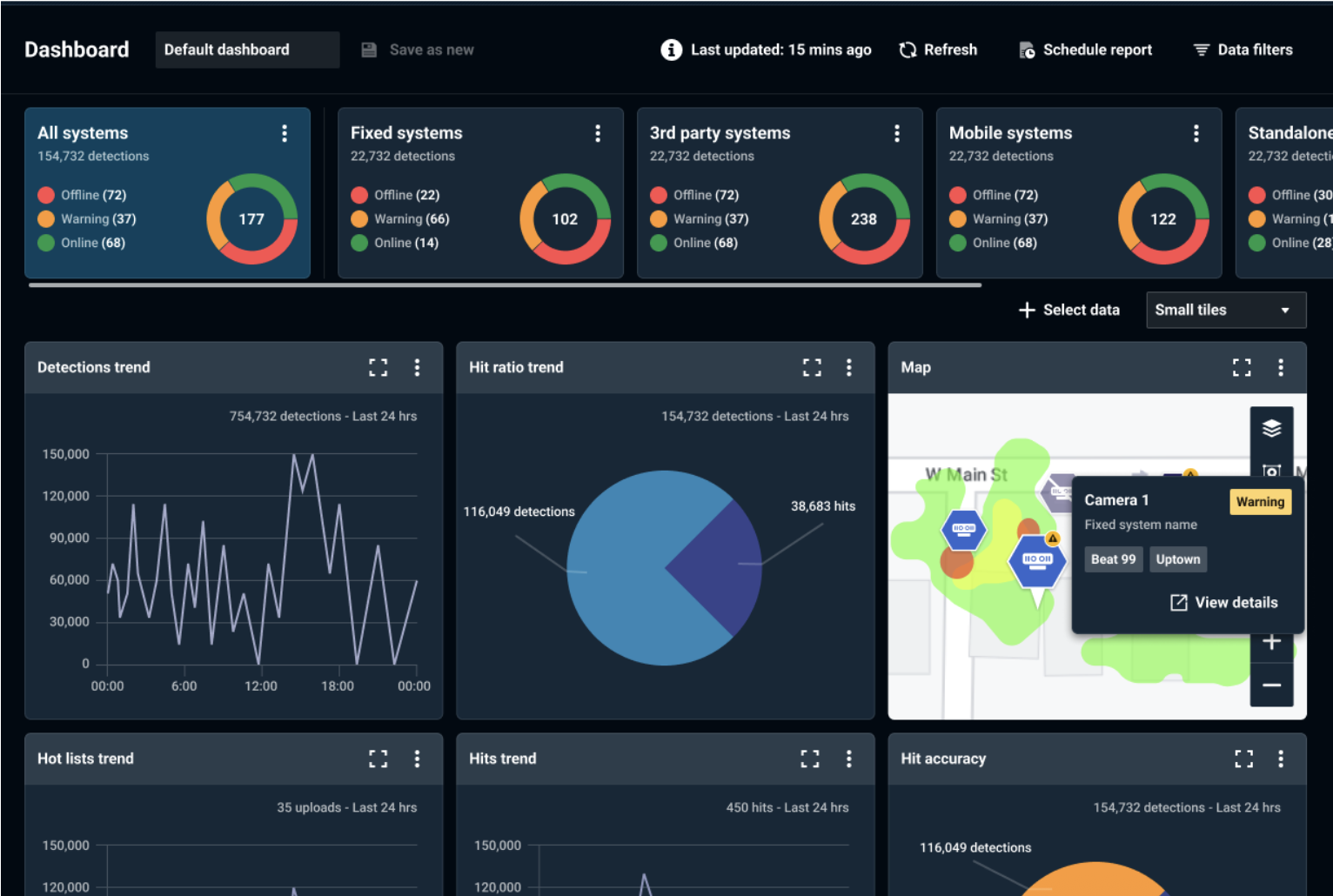
The new VehicleManager Dashboard is now available, offering Agency Managers a powerful tool to visualize, configure, and export LPR data and system information. Accessible from the Left Navigation Bar, the Dashboard allows you to instantly monitor system health with status tiles, build a custom view with moveable graphs and maps, filter data by source and schedule automatic reports.
Case management
The new Case Management page allows you to store, manage, and view reports and preserved detection records that you have created while performing searching and analytics functions. Agency Managers can view all reports created by the Agency. You can access the Case Management feature from the Left Navigation Bar.
Automatic browser device authorization
Two new automatic device authorization options have been added in Agency Settings. When these options are enabled, Users and Agency Managers will not be prompted to approve device authorizations.
Read more in the VehicleManager 8.0.251 TSB.
Go back to the top ↑
June 2025
VehicleManager 8.0.248
Enable multi-factor authentication for login option
Agency Managers now have the option to enable or disable the multi-factor authentication requirement in Agency Settings → Agency Details for all agency users.
Output Report options
The Output Report pop-up will now grey out options that are invalid for the current selection of records. For example, the option to create a report for more than 100 records is not available when more than that are selected.
Improvements to Add Multiple Plates feature
In Vehicle Search, when more than one plate is present in Plate Number, clicking the plate will now open the Add Multiple Plates window.
Match Registration State to Hot List option
An option has been added in Hit Search to omit results that do not have a Registration State matching the records of the originating Hot List.
Show daytime images on hover option
An option to display daytime images has been added to the Detection List in Vehicle Search. You can also display daytime images in Table View → Customize Table.
Read more in the VehicleManager 8.0.248 TSB.
Go back to the top ↑
May 2025
VehicleManager 8.0.244
Suggested data sharing
To make reciprocal data sharing easier, VehicleManager will now present a list of Agencies that are sharing data to your Agency and a list of Agencies that are not receiving shared data from your Agency.
Read more in the VehicleManager 8.0.244 TSB.
Go back to the top ↑
February 2025
VehicleManager 8.0.244
Device authentication
To comply with CJIS standards, all devices, computers and systems that connect to VehicleManager must be authenticated in order to log on, upload detections and download hot lists. The new Devices page is used to manage and authenticate devices. To authenticate devices in VehicleManager, log on as an Agency Manager and go to: Device Authentication → More → Authenticate Device.
See the VehicleManager Passkey QuickStart Guide for more information on authenticating Windows computers used to access VehicleManager.
Batch plate search
Vehicle Search now contains the option to +Add Multiple Plates for performing searches with many license plates, by using Copy (Ctrl-C) and Paste (Ctrl-V).
Map View icons
Map View icons have been updated to reflect the type of information they represent. Refer to the map Legend to view a description of each new icon type.
Logout timer
Agency Managers can now extend the session timeout period after which users must log on again in Agency Settings → Agency Details → Audit Settings.
Read more in the VehicleManager 8.0.244 TSB.
Go back to the top ↑
December 2024
VehicleManager 8.0.241
Incident Communications Platform
The new Incident Communications Platform notifies you of disruptions to VehicleManager, as well as Motorola’s other cloud-based products and features. In addition to email notifications, you can view a status dashboard and enable SMS alerts.
Profile alert settings
Agency Managers can now view and set alerting options for individual accounts from User Management. When Profile alert settings is selected, these settings override the selections made in User Profile. Additionally, Custom System Profiles and User Profiles can now be edited and deleted.
Hit Search
Searches saved in Hit Search will now display the Alert Type on the search card. The most recent record will be displayed for searches with multiple alert types.
Read more in the VehicleManager 8.0.241 TSB.
Go back to the top ↑
October 2024
VehicleManager 8.0.240
VehicleManager 8.0 launch
The VehicleManager 8.0 update packages all of the core features, functionality and data analytics tools from previous versions into Motorola Solutions’ intuitive user interface, creating a more efficient and effortless user experience.
Agency management
Multiple agency management features are now available to Agency Managers in the VehicleManager 8.0 interface.
Additional filtering options for data sharing
The Data Sharing (Internal Server) feature has been updated to include new quality-of-life features that make detection sharing easier.
Public domain support for approved public email domains
Agency Managers can now approve public domains for use with VehicleManager user accounts. Previously, only official government domains were allowed for use.
Third-party system support
VehicleManager now supports third-party camera systems.
To learn more about these updates, view the VehicleManager 8.0.240 TSB.