Whether you’re getting started with real-time intelligence or growing your capabilities, CommandCentral Aware is designed to empower you with the situational awareness you need. It acts as a common operating picture, consolidating data from multiple systems into a single, intuitive interface.
To get you started, here are the core modules available to you within CommandCentral Aware:
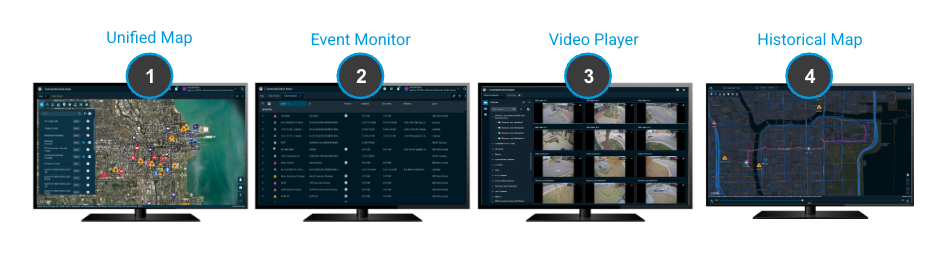
Esri-Based Map View: CommandCentral Aware offers a mapping interface, powered by Esri, to display resources, event locations, and alerts overlaid on detailed base maps and customer-specific GIS layers. Operators can view all location-based data on the map display. Additionally, key integrations can be seen, such as FirstTwo and CRG Floorplans.
Configurable Event Monitor: CommandCentral Aware’s customizable event monitor displays a running list of events and resource alerts. Operators can filter by type, create tabs for different event types, and show, hide or reorder columns. Pin events or apply filters to the map for a consistent view. Event details can be opened in a dialog box.
Video Player*: CommandCentral Aware’s video player eliminates the need for disparate viewing applications. The video player allows you to integrate and view video from almost any source, including video management systems as well as body, in-car and license plate recognition cameras. This helps operators gain valuable visibility into the field, quickly identify emergency situations and provide remote oversight.
Historical Map: The historical map allows users to review responses through the lens of mapped events and resources, as well as historical video. Replay the incident as it unfolded to inform future workflows.
*The video player is available only for agencies with integrated video sources
Beyond the core modules, automatic actions can be configured in CommandCentral Aware based on events through the rules engine. For example, events in the event monitor can be highlighted, and audible alerts triggered, reducing steps in incident support. Automation rules trigger actions; a panic button alert, for instance, can pin and highlight the event in the event monitor, zoom to the location and play nearby cameras in the video player. There are numerous ways that rules can be set up by Administrators to support users’ workflows.
In addition to customizing user workflows using automation rules, additional integrations into CommandCentral Aware can expand its possibilities.
For more CommandCentral Aware knowledge, visit the CommandCentral Aware Manual.