In this article
Discover cutting-edge updates across PremierOne. From advanced mapping capabilities and integrated systems to improved data sharing and enhanced user features, see what’s new to boost efficiency.
March 2026
PremierOne Mobile | PremierOne Records | PremierOne CAD
PremierOne Release 4.6.21: Innovation driven by you
We’ve been working hard to make sure the PremierOne suite is the most reliable, user-friendly solution in the industry. You can expect to see the 4.6.21 general release arriving mid-March 2026, delivering the newest features and improvements you need to get the job done efficiently.
This update isn’t just about technical milestones; it’s about our partnership with you. The feedback and suggestions provided by our Product Advisory Groups and submissions to the Idea Portal had a direct impact on the enhancements included in this release—ranging from critical mobile workflows to advanced reporting.
Let’s take a look at some of the key accomplishments achieved in this release.
PremierOne Mobile
New Mobile Map: Precision and flexibility
Our mobile teams have crossed several long-awaited finish lines to deliver the new Mobile Map, complete with all the features of our classic versions, plus the flexibility you asked for.
- Right-click to start an incident (user-suggested feature): Directly based on your feedback, you can now start incidents or traffic stops right on the new Mobile Map by right-clicking on a location. The system will instantly reverse geocode the address for you.
- Dynamic unit-type routing: We eliminated the need for separate map packages for different unit types. Now, the system actively routes you based on your specific vehicle restrictions—like ensuring a heavy fire engine isn’t routed over a weight-restricted bridge.
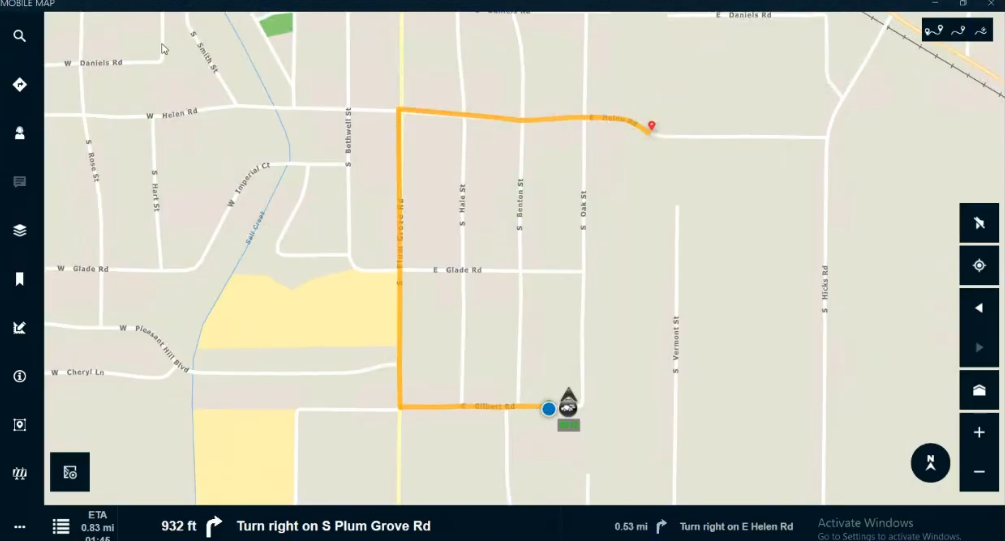
- Enhanced visibility: Following community requests, unit icons now include real-time GPS status (yellow for Stale, red for Inactive) and directional travel indicators so you can see exactly where your team is and where they are headed.
- Android & iOS features update: We’ve brought features like ‘Login Additional Crew’ and ‘Stay Logged In’ (for non-CJIS agencies) to both major mobile platforms. This means you get a seamless experience, no matter what hardware you use.
Go back to the top ↑
PremierOne Records
Records Management System (RMS): Streamlining the Records workflow
The Records team is focusing on how to make a big difference in a dispatcher’s daily life, including enhancing solution integrations.
- PremierOne RMS & Flex Jail integration: Dispatchers can now see critical system alerts from PremierOne Records, such as warrants and civil papers, displayed right inside Flex Jail.
- Folder subscriptions (Advisory Group win): Based on your requests, you can now easily subscribe to “new” documents in Case Folders. Conveniently manage viewing capabilities to see both personal and shared subscriptions.
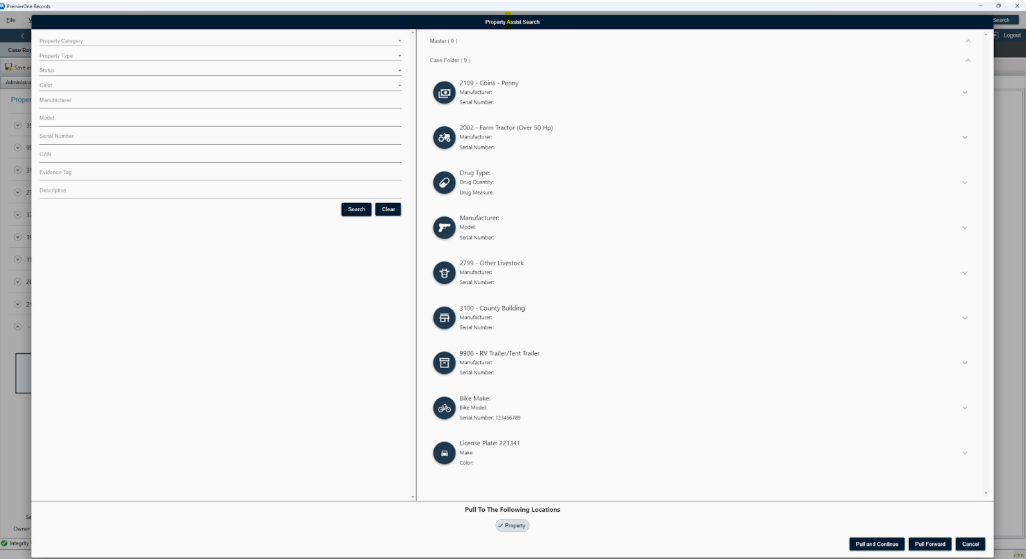
- Intelligent Pull Forward: We made the new Pull Forward Wizard for Property feature smarter. It now only shows you the relevant fields based on the product category (Bicycle, Weapon or Drug), saving time and reducing screen clutter.
- New livestock icon: If needed, assign the “cow” icon to any livestock property.
Go back to the top ↑
PremierOne CAD
Computer-Aided Dispatch (CAD) & Reporting: Data with integrity
Our CAD and Reporting teams built powerful new tools, providing stronger data security and deeper operational insights.
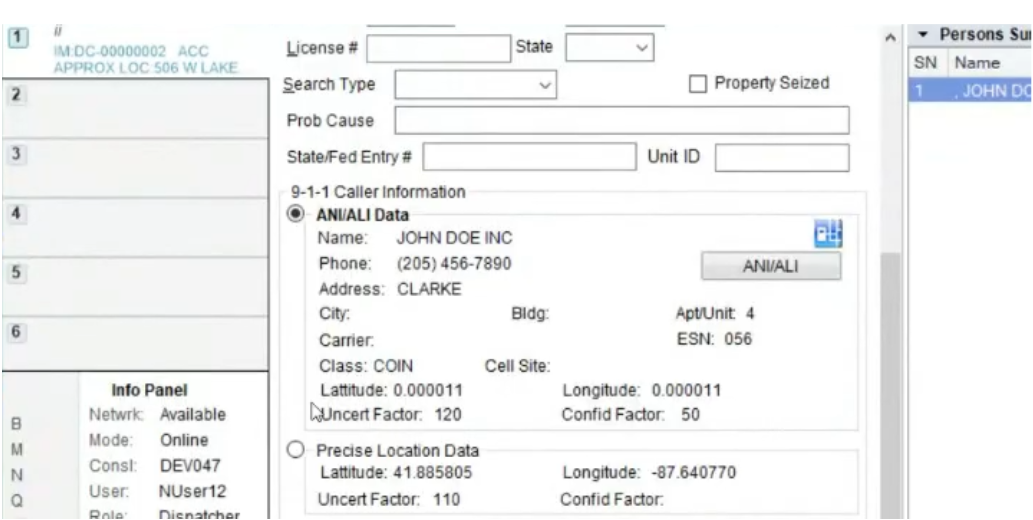
- ‘Precise Location’ label: We updated the ‘RapidSOS’ label to ‘Precise Location’ across the entire suite (Windows, iOS, Android and CAD). Now, you’ll see more accurate location data.
- Integrity validation: To help support your CJIS compliance efforts, PremierOneAgent now verifies the digital signature of core files upon startup. It also automatically logs any tampering or missing credentials to the Windows Event Viewer.
- Deep-dive reporting: Use customer queries in the RDW to extract unit roster data, including active staffing details and status change history. This gives you total visibility into how long your staff has maintained their current roles.
Go back to the top ↑
What’s next?
The work doesn’t stop here. While you’ll see the 4.6.21 release in mid-March, our teams are already putting the finishing touches on the 4.6.22 Limited Release, coming late April 2026.
We want to say thank you to our Product Advisory Groups for your continued guidance. Your suggestions are the roadmap for our innovation and help us build solutions that work for you.
To learn more about these updates, view the 4.6.21 release notes. If you are interested in updating, please contact our support team.
Go back to the top ↑
June 2025
PremierOne CAD | PremierOne Mobile | PremierOne Records
PremierOne CAD
We are excited to share what’s new with PremierOne CAD for 4.6.19:
- Ability to enter, verify and retrieve latitude and longitude for a given What3Words location
- Ability to center the Universal Map on unit and incident icons
- AXS Console Integration
- Added Partial Mapping Module support for Chromium browsers, covering sub-pages:
- GIS Data
- Location Data
- MUD Setting
- Route Solving
- Person Location
Learn more and access documentation here.
Go back to the top ↑
PremierOne Mobile
We are excited to share what’s new with PremierOne Mobile for 4.6.19:
- Ability to display on map and get routing directions to RapidSOS location (Windows, iOS and Android)
- Ability to display on map and get routing directions to What3Words locations (Windows, iOS and Android)
- Ability to get routing from any status and any location, regardless of if assigned to an incident or available (Windows)
Learn more and access documentation here.
Go back to the top ↑
PremierOne Records
We are excited to share what’s new with PremierOne Records for 4.6.19:
- Pull Forward Location
- Copy/Paste – Read Only Fields
- Workflow Rights at Module Level
- Citation/Case Number Validation
- Link Related Cases Across Agencies
- Pipeline Stability Improvements – Vault and List Management
Learn more and access documentation here.
Go back to the top ↑
March 2025
PremierOne CAD | PremierOne Mobile | PremierOne Records | Flex Jail
PremierOne CAD
We are pleased to announce the release of significant updates to PremierOne CAD with 4.6.17. These updates, driven by customer feedback and our commitment to continuous improvement, focus on enhancing user experience, addressing critical defects and introducing new features.
All details can be found within the release notes for PremierOne CAD/Mobile and PremierOne Records.
Proactive recommendations
We’ve enhanced our proactive recommendations feature to include unit recommendations from outside the primary unit agency. This update allows for more comprehensive recommendations in auto-aid situations where multiple agencies respond to calls together. A new configuration setting has been added to the tool portal under “Unit Recommendations” to enable this functionality. Detailed instructions on how to use this setting are available in the release notes.
ProQA enhancements
For ProQA users, we’ve implemented an enhancement to prevent information from being directed to the wrong incident. Users will now receive a message to close or hold the ProQA case before clearing or reusing the tab. Additionally, for Powerphone users (now called Total Response), we’ve expanded the ability to use multiple modifying circumstances, improving the integration’s utility for agencies with diverse needs.
Alpha Incident Priority Aliases
Following the provisioning work in version 4.6.16, alpha incident priority aliases are now visible on the Web CAD Client. This update ensures that these aliases are displayed wherever priority information is shown, such as on status monitors.
Contractor Fields in Call for Service XML
We’ve added contractor fields to the call for service XML sent to RMS. These additions provide more comprehensive data transfer between systems.
Hot Hits Query Functionality
Hot hits functionality has been extended to CommandCentral Responder, ensuring that users can effectively run queries and receive relevant hot hit notifications.
Roll Call API and LSP Updates
Updates to the Roll Call API have been made to support integrations with HR systems for user management. Additionally, the Location Service Proxy (LSP) has been updated to accept commands and control responder updates, upgraded to .Net 8, and made MEP ready.
GIS Tools for ArcGIS Pro
The PremierOne GIS tools for ArcGIS Pro are now complete and available. These tools are largely release-agnostic and will soon be available as a separate package on the myView portal. The suite includes familiar tools from the Class 8 version, with the exception of the “Create PremierOne Network Dataset” tool, which now utilizes an ArcGIS Pro tool.
Go back to the top ↑
PremierOne Mobile
Map improvements
A primary focus for this release was addressing map defects, particularly within the new mobile map. Issues such as incorrect status displays, GPS processing errors and missing text have been resolved. For this first phase, we have initiated the removal of dependencies between the classic and new mobile maps in Windows. More work will come in the second phase.
User experience enhancements
For Windows users, we have implemented a “force user off” feature to resolve issues with shared devices and users becoming stuck on the database or workstation. Android users will now benefit from configurable menu icons, aligning with existing functionality in iOS and Windows.
iOS updates
We have introduced a “stay logged in” setting override for Fire and EMS customers using iOS. This allows users to stay logged in to the app without continuously having to enter their username and password, since Fire and EMS users work 24-, 48- and 72-hour shifts. This is not recommended for agencies with CJIS requirements. A critical update for iOS also addresses the unit exchange command in CAD, providing users with notifications of incident changes.
Language settings
Language settings have been added for both iOS and Android. Android now supports English, Spanish, and French while iOS supports English and Canadian localization.
Go back to the top ↑
PremierOne Records
State layer work
As with every release, we’ve conducted state layer work. Remember, this can be OD’d to different versions, so if you see something that applies to your agency but you’re on a different version, please contact support.
Defect resolution and stability
We’ve addressed various defects and focused on stability improvements to ensure a smoother and more reliable system. For a comprehensive list of defect fixes, please refer to the release notes.
.Net 8 on client side
We’ve incorporated .Net 8 on the client side. More details and information can be found in the release notes.
Pipeline enhancements
This release marks the beginning of several pipeline enhancements aimed at improving performance, particularly in analysis and auditing functionalities. We understand the importance of pipeline performance, and this is the first of many improvements to come.
Database job stability
We’ve also worked on stability improvements around database jobs.
Data flow update
An update to data flow for DH store as it relates to property has been implemented.
New features and functionalities
- Multi-select search – You can now select multiple options from the drop-down lists in basic searches, allowing for more comprehensive and combined search results.
- Enhanced folder icon availability – The folder icon is now available upon saving, eliminating the need to save and close to access it.
- Distinguishable expired alerts – Expired alerts now have a different icon and color, making it easier to differentiate between active and inactive alerts.
- Auto-generate property sheets – You can now auto-generate property sheets from case reports or officer reports, reducing duplicate data entry. Note: This release focuses on generating new property sheets. Updates to existing ones will come in future releases.
- Multi-factor authentication (MFA) enhancements – For our customers using MFA, we’ve added Keycloak token expiration functionality, which allows for an inactivity timeout to enhance security.
- Multi-agency data sharing (cloud integrations) – For our cloud integration customers, particularly consortia, we’ve enabled multi-agency data sharing and configuration of security groups and users.
Go back to the top ↑
Flex Jail
Public inmate search in CityProtect
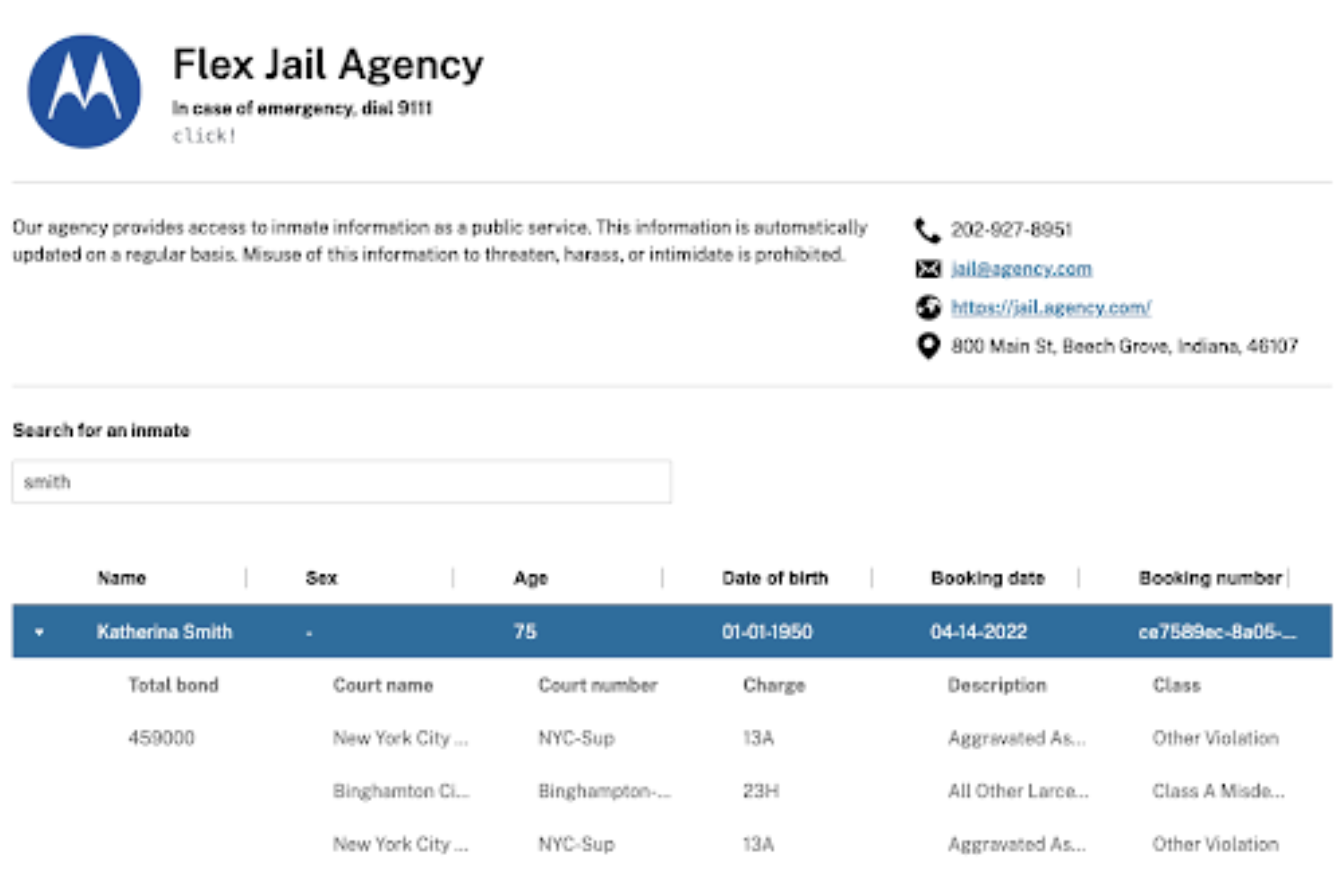
Starting in Q2, agencies will have the ability to display inmates online to the public using CityProtect. This will hopefully cut down on calls to the jail, allowing citizens to see for themselves who is incarcerated, why they are incarcerated, and check their bonds. The information displayed on the webpage is 100% controlled by the agency in order to provide you with the control you need to make the webpage fit your community’s needs.
This update does require Hybrid Activation through cloud services. It’s also important to note that this is a paid service or included as part of the jail functionality in a Flex subscription.
Online pre-booking form
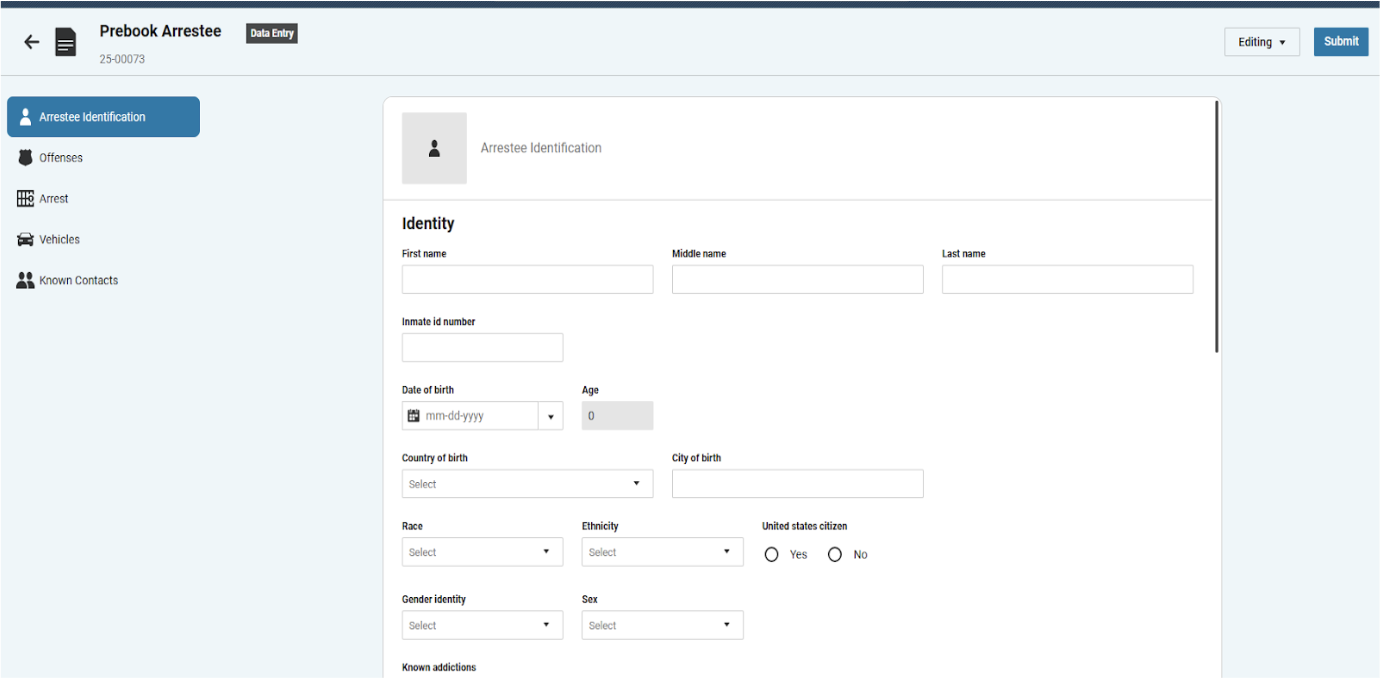
Also starting in Q2, this update will allow third parties and other partners that our agencies work with, who are not on the Flex system, to create a pre-booking form. The third party officer will come to the webpage with a pre-booking form that they can fill out. The form will then be pushed to the jail where the jail personnel can review the booking and either accept or reject. If they accept, it will push into Flex Jail. If they reject the booking, it will be sent back to the arresting officer, giving them the opportunity to compile the needed information before they resubmit.
This update also requires Hybrid Activation through cloud services.
These updates reflect our dedication to providing reliable and efficient solutions for public safety agencies. We encourage you to review the full release notes for a comprehensive list of changes and enhancements. As always, we welcome your feedback as you begin using the 4.6.17 release. If you have any questions or require assistance, please do not hesitate to contact support.
Go back to the top ↑
To access previous product updates that are not listed on this blog, click here.